Semantic Digital Twin
In MuPIF, the Digital Twin is not a dashboard or a single simulation model. It is a structured, semantic description of your physical system: its entities, their attributes and the relations between them. Simulation workflows read from the Digital Twin and write back to it. MuPIF calls this the Entity Data Model (EDM).
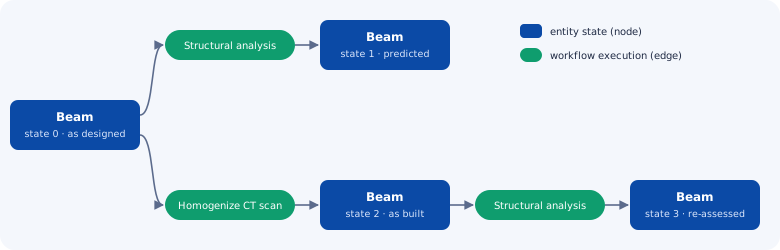
What the Entity Data Model gives you
-
Your own data model
You define the entities, attributes and relations for your domain in a JSON schema: a beam and its cross-sections, a device and its layers, a material and its microstructure.
-
Physical units and types
Every attribute carries its physical unit, shape and data type. Values are validated and units are converted automatically.
-
Generated database and API
The data management system (MuPIF DB) is generated directly from the schema, so there is no database code to write. The twin is accessible through a REST API.
-
Full history and provenance
Entity states are never overwritten. Workflow results are written into new, cloned entity states. Each new state is linked to the execution, inputs and workflow version that produced it.
-
What-if branches
Compare design variants, as-designed and as-built states, or alternative models side by side. Each is a branch in the state graph of the twin.
-
Semantic interoperability
MuPIF objects and their metadata are described by schemas that form a core ontology. Third-party data management systems can be connected through a generic foreign DMS interface.
Define the twin with a JSON schema
The structure of the Digital Twin is defined by a JSON schema. The example below describes a
concrete beam. The beam has a cross-section, the cross-section contains representative volume
elements (RVEs) of concrete, and each RVE is derived from a CT scan. Attributes specify units
(unit), array shapes (shape) and data types (dtype), and link defines relations to other
entities.
{
  "Beam": {
    "cs":      { "link": "CrossSection" },
    "length":  { "unit": "m" },
    "height":  { "unit": "m" },
    "density": { "unit": "kg/m3" }
  },
  "CrossSection": {
    "rve":          { "link": "ConcreteRVE" },
    "rvePositions": { "shape": [-1, 3], "unit": "m" }
  },
  "ConcreteRVE": {
    "ct":        { "link": "CTScan" },
    "size":      { "shape": [3], "unit": "um" },
    "materials": { "link": "MaterialRecord", "shape": [-1] }
  },
  "CTScan": {
    "id":    { "dtype": "str" },
    "image": { "dtype": "bytes", "externalize": "true" }
  }
}
MuPIF DB generates the database structure and its API from this schema. You can then create, query and update entities without writing any database code.
Run workflows on the twin
Workflow inputs and outputs are declared in the workflow metadata. An EDMPath binds an input or
output to an attribute of an entity in the twin:
'Inputs': [
    {'Type': 'mupif.Property', 'Type_ID': 'mupif.DataID.PID_Length', 'Name': 'Beam length',
     'Units': 'm', 'ValueType': 'Scalar', 'Required': True, 'Set_at': 'timestep',
     'EDMPath': 'Beam.length'},
],
When a workflow is executed on a selected entity of the twin, MuPIF:
- reads the workflow inputs from the twin; these are the initial conditions of the simulation,
- runs the workflow on the distributed simulation platform, locally, on remote servers or on HPC,
- writes the outputs into new, cloned entities that represent the updated state of the system,
- records the execution (inputs, outputs, workflow version and logs) for full traceability and reproducibility.
The same workflow can run on any entity that conforms to the schema. Once a workflow is validated, it becomes a reusable service for the whole twin.
Explore the twin
The EDM Visualizer is a browser tool that shows the entity graph of a twin through the MuPIF DB REST API. It displays the provenance of each entity and the workflow executions that created it.
Learn more
- B. Patzák, S. Šulc, V. Šmilauer. Towards digital twins: Design of an entity data model in the MuPIF simulation platform. Advances in Engineering Software 197, 2024. Open access
- EDM sources and Jupyter notebooks in the MuPIF DB repository
- Get started with the demo infrastructure, which includes MuPIF DB
 (since February, 2023)